
Complete documentation for Petasos on iPhone, iPad and Mac. For the five-minute version, see quick-start.md.
Contents
- What Petasos is (and isn't)
- Requirements
- Pairing a gateway
- The Activity cockpit
- Sessions and chat
- Organising: categories, channels, pinning, archive
- Approvals
- Scheduled jobs (cron)
- Multiple gateways
- macOS-specific features
- Settings reference
- Privacy and data handling
- Troubleshooting
- Glossary
1. What Petasos is (and isn't)
Petasos is a client. The intelligence, the tools, the files and the conversation history all live on your Hermes Agent gateway, running on hardware you control — a home server, a workstation, a VPS.
Petasos has no backend of its own. There is no Petasos account to create, no server of ours in the path, and no copy of your data anywhere but your device and your gateway.
This has one consequence worth stating plainly: if your gateway is unreachable, Petasos can't do much. It will show you cached session titles and let you browse Demo Mode, but live work requires a live gateway. Most problems people hit with Petasos are really network problems between the app and their own server — see Troubleshooting.
2. Requirements
| iOS / iPadOS | 17 or later |
| macOS | 14 (Sonoma) or later |
| Gateway | A reachable Hermes Agent gateway |
| Purchase | One Universal Purchase covers iPhone, iPad and Mac |
Your gateway must be reachable from the device — over your LAN, a VPN such as Tailscale, or a public hostname. Petasos does not tunnel or proxy anything on your behalf.
3. Pairing a gateway
Demo Mode first
On first launch, tap Try Demo Mode. This loads the complete interface with example data and no network activity at all. Nothing you do in Demo Mode touches a real gateway. Leave it any time from Settings.
Option A — QR pairing (fastest)
On the machine running your gateway:
hermes-pair-qr
This prints a QR code encoding your gateway URL and credentials. In Petasos, tap Scan pairing QR code and point the camera at it. The app pairs and connects in one step — nothing to type.
On macOS, you can also import a QR from an image file, drag one onto the pairing window, or simply copy it to the clipboard — the app detects it automatically.
Option B — Manual entry
Tap Or enter manually and provide:
- Gateway URL — e.g.
https://your-host:8443 - Username and password — if your gateway requires authentication
Petasos probes /api/status first and tells you what the gateway expects before asking for
credentials, so a typo in the URL surfaces immediately rather than as a failed login.
Option C — From an already-paired Mac
Mac → Settings → Pair iPhone or iPad… displays a QR code for your phone to scan. Useful when the Mac is already working and you don't want to re-derive the credentials.
Where credentials live
In the device Keychain, and nowhere else. They are transmitted only to the gateway address you configured. Each paired gateway keeps its own credentials, sessions, categories and unread state, fully separate from the others.
4. The Activity cockpit
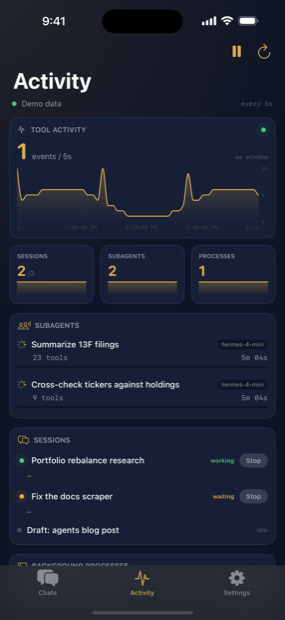
The cockpit is what makes Petasos more than a chat client. It shows, live:
| Panel | What it tells you |
|---|---|
| Tool activity chart | Rate of tool calls over time — the agent's "pulse" |
| Sessions | How many are busy versus total |
| Subagents | Delegated work in flight, with tool-call counts |
| Processes | OS processes the agent started, with PID and uptime |
| Live feed | Turn starts and finishes, subagent spawns, process events |
Refresh interval is adjustable — 5s, 15s, 30s, 1m, 2m, 5m. Faster gives a livelier feed at the cost of battery and gateway traffic. You can pause polling entirely and refresh on demand.
Stopping things: tap the stop control beside any running session or process to interrupt it. This sends a real interrupt to the gateway, not a UI-only cancel.
A note on the chart: it plots samples collected within the selected time window. If you pick a 5-second window you'll usually see "Collecting activity…", because almost no samples fall inside five seconds. Use 1m or 5m for a meaningful curve.
5. Sessions and chat
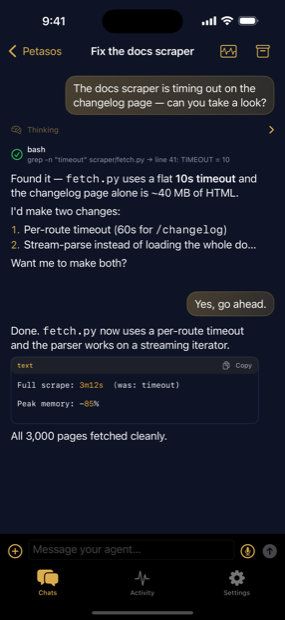
Starting a session
Tap + (iOS) or press ⌘N (Mac). If the gateway is unreachable, Petasos tells you why and retries rather than failing silently.
The transcript
- Streaming replies render as they arrive.
- Markdown: headings, lists, tables, block quotes.
- Code blocks are syntax-tinted with a one-tap Copy button.
- Reasoning (the agent's thinking) appears in a distinct muted style.
- Tool calls show the tool name and its command or result inline.
Composing
| Control | Does |
|---|---|
| Mic | Dictation, transcribed on-device |
| + | Attach a file |
| Send | Submit the prompt |
Dictation records first and transcribes when you stop, rather than streaming. This is deliberate: streaming transcription fails silently when the on-device speech model isn't present, and a recording that transcribes reliably afterwards beats one that looks live and loses your words.
Auto-scroll has three modes in Settings: always follow, follow only when already at the bottom (default), or never.
6. Organising: categories, channels, pinning, archive
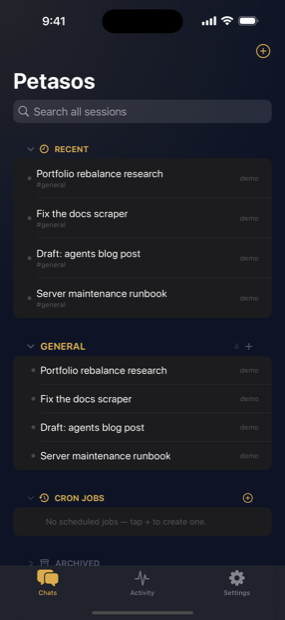
- Recent — your most recent threads, expandable to full history.
- Categories and channels — a Discord-style tree.
Home / #generalalways exists as a fallback and cannot be deleted. - Pinning — keep important sessions at the top.
- Unread indicators — dots show threads with activity since you last looked.
- Search — full-text across everything your agent remembers.
- Archive — hide a session without deleting it.
- Reordering — drag sessions between channels.
Scope note: on macOS the category tree is currently stored on that Mac rather than synced from the gateway. It is labelled as such in the UI. When gateway-side org sync lands, your local tree becomes the starting state.
7. Approvals
When the agent wants to run something that needs permission, Petasos surfaces it wherever you are:
- In the transcript, as an inline banner with the tool name and command.
- As a notification — approve or deny straight from the banner.
- In the Activity view, counted under "waiting".
- On macOS, in the menu bar cockpit and as a Dock badge.
Approving or denying sends the decision to the gateway immediately. If you have several pending, the menu bar shows the first three and a count of the rest.
8. Scheduled jobs (cron)
Create recurring agent jobs in plain language — "every day at 8am", "every 10 minutes" — which Petasos translates into a cron expression (and parses back, so you can edit either way).
- Pause / resume with one tap.
- Runs feed — browse the result of every past run.
- Notifications when a run finishes.
- Same-thread continuation — a job can keep replying in one thread instead of spawning a new session each time, so context accumulates.
Demo Mode seeds example cron jobs on iOS but not on macOS.
9. Multiple gateways
Pair as many as you like — a home server and a work VPS, say — and switch instantly.
- iOS: Settings → Gateways. Tap to switch. Swipe left or touch and hold to remove.
- macOS: Settings → Paired gateways, with Switch and a trash button per row. The sidebar footer has a gateway menu.
Each gateway keeps its own sessions, categories, unread state and cached history. Switching tears down the old connection cleanly before opening the new one. Removing the active gateway switches to the next one, or disconnects if it was the last.
10. macOS-specific features
The menu bar cockpit
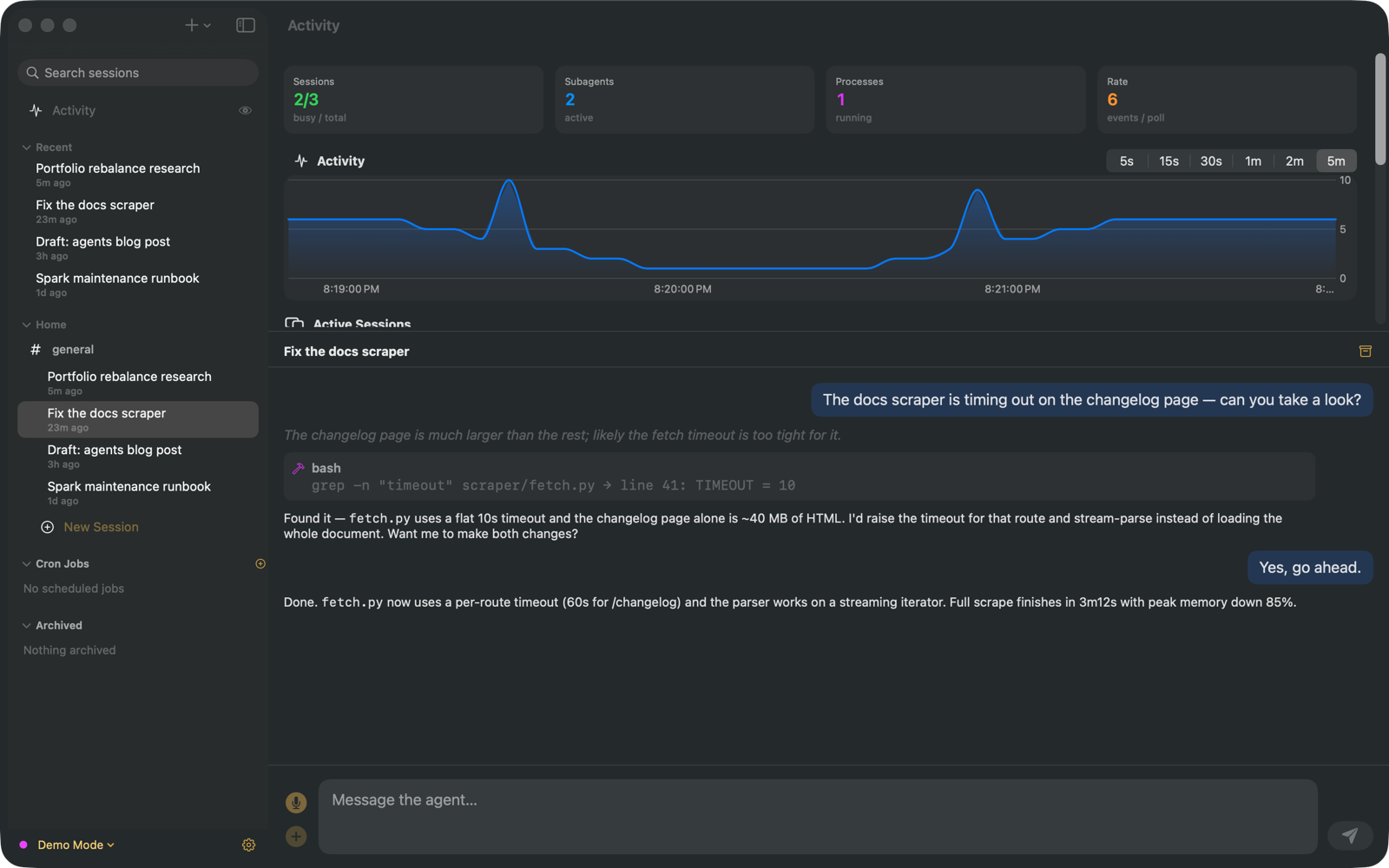
A glance at your agent without leaving what you're doing: busy sessions, active subagents, running processes, and anything waiting on you. Approval requests can be answered inline from the menu bar. Open the app, start a session, reconnect or quit from the same menu.
Windows and layout
- Multiple windows — open any session in its own window.
- Split view — the cockpit above, your conversation below, with a draggable divider.
- Resizable sidebar, right-click menus throughout.
- Dock badge showing pending approvals.
Keyboard shortcuts
| Shortcut | Action |
|---|---|
⌘N |
New session |
⌘F |
Search sessions |
⌘K |
Command palette |
⌘R |
Reconnect |
⌘. |
Interrupt current run |
⌘1 |
Toggle Activity |
⌘, |
Settings |
11. Settings reference
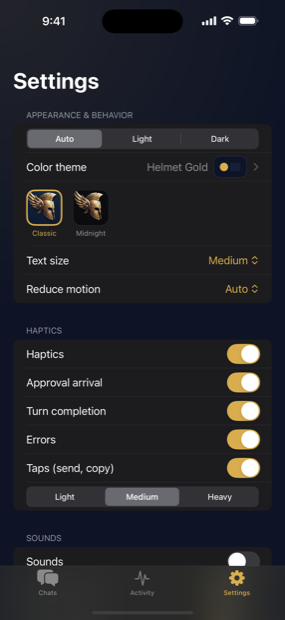
Appearance — Auto / Light / Dark; six colour themes; text size; reduce motion; two app icons (iOS).
Chat — streaming markdown; code syntax highlighting; timestamps; auto-scroll mode.
Activity — refresh interval; toggles for subagents, processes and the live feed.
Notifications — banners for approvals, completions and cron runs; whether banners appear while the app is frontmost; unread indicators.
Sounds / Haptics — a master switch plus per-event control for approvals, completions, errors and taps.
Gateways — the paired list, add, pair by QR, switch, remove.
Data & Privacy — anonymous error reports (off by default); Export diagnostics log.
12. Privacy and data handling
- No backend of ours. Petasos talks only to the gateway you configure.
- No tracking, no analytics, no third-party SDKs.
- Credentials live in the device Keychain, protected by the OS, and are sent only to your gateway.
- Error reporting is strictly opt-in. When enabled, reports contain app version, OS version and redacted error events — no URLs, no credentials, no chat content, no gateway identity. Nothing is linked to you.
- Permissions: camera is used only to scan pairing QR codes; microphone and speech recognition only for on-device dictation into the message box.
Privacy policy: https://petasos.tabotec.com/privacy.html
13. Troubleshooting
The gateway shows red / "Idle"
Work through these in order:
1. Is the gateway reachable at all? From any browser on the same network:
https://your-host:8443/api/status
JSON back means the server is healthy and the problem is the app or the path between them. Nothing back means the problem is your server or network — start there.
2. Are you on the VPN?
A tailnet address like yourbox.tailnet.ts.net resolves only while Tailscale is
connected. If the VPN drops, the hostname stops existing and the app cannot find the server.
This is by far the most common cause.
3. Is the URL stale?
If your gateway's LAN IP changed — a new router, a DHCP lease — a stored 192.168.x.x
address will no longer work. Prefer a hostname or tailnet name, which don't go stale.
4. Were the credentials rejected? Repeated failed logins can trigger the gateway's rate limiter, after which even the correct password fails for a minute or two. Wait, then re-pair — ideally by QR, so there's nothing to mistype.
5. Export the diagnostics log. Settings → Export diagnostics log. It records connection attempts and the real underlying error. Two you'll see often:
| Log line | Means |
|---|---|
A server with the specified hostname could not be found |
DNS failure — usually VPN disconnected |
Sign-in rejected — check the username and password |
Credentials wrong, or rate-limited |
New session does nothing
Almost always a dead connection. The app should tell you and retry automatically; if it doesn't, check the gateway status first.
The Activity chart says "Collecting activity…"
The selected time window is shorter than the sample interval. Switch to 1m or 5m.
Sessions are missing after a gateway restart
Gateway restarts invalidate runtime session IDs. Pull to refresh; stored sessions reappear. Empty sessions that were never written to may not be listed by the server.
14. Glossary
| Term | Meaning |
|---|---|
| Gateway | The Hermes Agent server you run. Petasos connects to it. |
| Session / thread | One conversation with the agent. |
| Subagent | A helper agent the main agent delegates work to. |
| Turn | One request-and-response cycle. |
| Approval | A permission request from the agent before running a tool. |
| Cron job | A recurring scheduled agent task. |
| Demo Mode | Full interface with example data, no gateway needed. |
| Pairing | Storing a gateway's address and credentials on the device. |
Petasos is an independent client for the open-source Hermes Agent by Nous Research, and is not affiliated with or endorsed by Nous Research.